
Henri Blog
Microlearning Content Solutions: How to Choose the Right One
Compare microlearning tools by audience, goal, format, integrations, and reporting to pick the best fit for retention or compliance.
By Henri · Updated
Most microlearning tools do one job well, not every job. If you need self-study, pick an AI tutor like Henri AI. If you need exam review, go with Quizlet. For field training, look at TalentCards or EdApp. For large company training with reporting and HR system links, Axonify, LearnUpon, or Docebo make more sense. Here’s the short version:
- Henri AI: best for solo study and active recall on mobile
- Duolingo: best for beginner language habit-building
- Quizlet: best for flashcards, spaced repetition, and test prep
- TalentCards: best for safety and field refreshers
- EdApp: best for deskless onboarding and short compliance lessons
- Axonify: best for daily frontline reinforcement at scale
- LearnUpon: best for compliance-heavy LMS needs
- Docebo: best for large teams that need role-based learning paths and skills tracking A good rule: match the tool to the outcome. If you want memory and recall, use retrieval-based formats. If you want audit trails and admin control, use an LMS-led system. If you want short daily practice, mobile-first tools usually fit better. One stat matters here: retrieval practice can lead to 61% retention after one week, vs. 40% for passive review. So I’d lean toward tools built around questions, flashcards, and recall - not just watching short lessons.
Top 5 Micro Learning Platforms You Need in 2025!
Quick Comparison
Microlearning Tools Compared: Best Use Cases, Features & Pricing
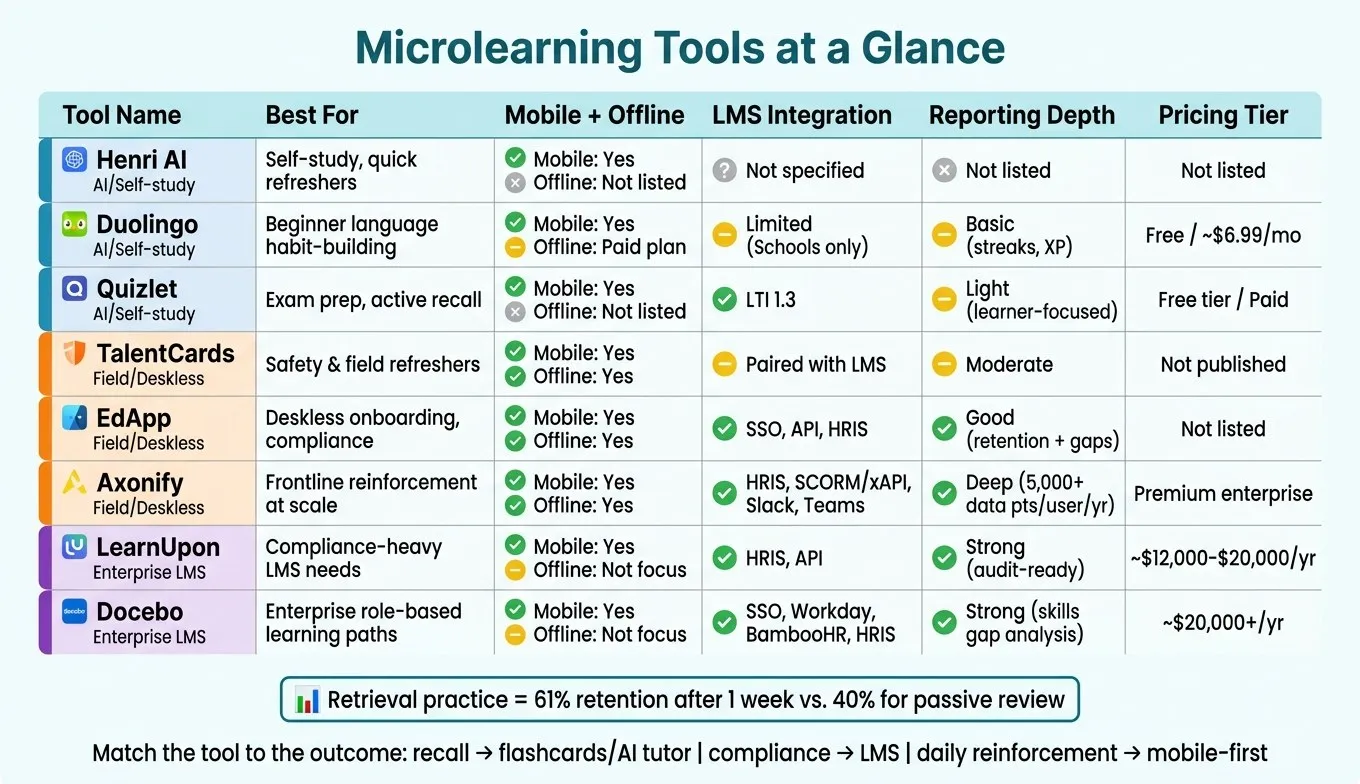
| Tool | Best for | Mobile | Offline | Integrations | Reporting |
|---|---|---|---|---|---|
| Henri AI | Self-study, refreshers | Yes | Not listed | Not listed | Not listed |
| Duolingo | Beginner language practice | Yes | Paid plan | Limited | Basic |
| Quizlet | Exam prep, recall | Yes | Not listed | LTI 1.3 | Light |
| TalentCards | Safety, field refreshers | Yes | Yes | Usually paired with LMS | Moderate |
| EdApp | Deskless onboarding, compliance | Yes | Yes | SSO, API, HRIS | Good |
| Axonify | Frontline reinforcement | Yes | Yes | HRIS, SCORM/xAPI, Slack, Teams | Deep |
| LearnUpon | Compliance LMS | Yes | Not the focus | HRIS, API | Strong |
| Docebo | Enterprise learning paths | Yes | Not the focus | SSO, HRIS | Strong |
If I were choosing, I’d ask just five questions first:
- Who is learning? Solo learners, office staff, or frontline teams?
- What is the goal? Study, compliance, refreshers, or language practice?
- What format fits best? Chat, flashcards, short modules, or LMS courses?
- Do you need system connections? HRIS, SSO, SCORM, or LMS support?
- How much reporting do you need? Basic progress or audit-ready tracking? That simple filter will cut the list fast and point you to the right type of tool.
1. Henri AI
Goal Fit
For readers picking a microlearning tool, Henri AI makes the most sense for guided self-study. It’s a better match for solo learning than for team training or formal admin needs. That means it works well if you want short, personal study sessions for new topics, quick refreshers, or general-interest subjects.
Content Format
Henri AI uses a chat-based interface that feels more like a tutor than a static course. You enter a topic and a goal, and the platform builds a custom syllabus for you. That can include diagrams, concept maps, study cards, and active recall.
Delivery and Integrations
Henri AI is available as an App Store mobile app, which makes it easy to fit in short sessions while you’re on the go.
Budget and Analytics
Pricing is not publicly listed.
| Criterion | Henri AI |
|---|---|
| Best for | Self-study, quick refreshers, general-interest topics |
| Content format | Conversational chat, visuals, study cards |
| Active recall | Yes |
| Mobile app | Yes (App Store) |
| LMS integration | Not specified |
| Team/admin reporting | Not specified |
| Pricing transparency | Not listed |
Henri AI stands out for learners who want guided self-study, mobile access, and active recall in one place.
2. Duolingo
Goal Fit
Duolingo is made for short, daily language practice. It works best for beginners who want to turn language learning into a simple daily habit. This is a good fit if you’re just getting started and want to learn the basics: a 50–100 word vocabulary, common greetings, and a few travel phrases. But it’s not built to take most people all the way to fluency. In fact, most users never reach the intermediate level [7]. It’s also not meant for employee training, compliance tracking, or strong conversation skills.
Content Format
Lessons usually take 5–15 minutes. Most of the work centers on recognition drills, like tapping the right answer, matching words, and doing short speaking prompts. That game-like setup helps people stick with it. Users who reach a seven-day streak are about 3.6 times more likely to stay engaged over the long run [5]. Still, Duolingo trains recognition more than production. So it’s better for repetition and daily practice than for open-ended speaking.
Delivery and Integrations
Duolingo is a mobile app for iOS and Android. It uses push notifications to pull people back in, and paid plans include offline mode for learning on the go. There’s also a Duolingo for Schools dashboard for educators. But if you need built-in connections with HRIS tools or most corporate LMS platforms, Duolingo comes up short [1].
Budget and Analytics
The free version is ad-supported and uses a “hearts” system that limits how many mistakes you can make. Super Duolingo removes ads, gives you unlimited hearts, and includes offline downloads [7]. Its reporting is pretty basic. You can track things like streaks and XP, but not language skill, compliance, or job-related progress.
| Criterion | Duolingo |
|---|---|
| Best for | Casual beginners, habit formation |
| Content format | Gamified, recognition-based lessons |
| Active recall | Limited (recognition, not production) |
| Mobile app | Yes (iOS and Android) |
| LMS integration | Limited (Duolingo for Schools only) |
| Team/admin reporting | Basic (no compliance tracking) |
| Pricing transparency | Free / about $6.99 per month |
3. Quizlet
Goal Fit
Quizlet works best for flashcard-based microlearning when learners already have the basics down and need a clean, structured way to review. It’s strongest for review and recall, not first-time learning [4]. That makes it a solid pick for exam prep and certification study, where the goal is often to revisit material, tighten memory, and spot weak areas [2]. Learn mode helps with that by focusing on terms the learner misses.
Content Format
At its core, Quizlet is built around digital flashcards. But it does more than simple card flipping. Learn mode uses spaced repetition and FSRS, which can cut review sessions by about 20% to 30% while keeping retention at a similar level [5]. It also includes a match-game for faster practice and Q-Chat, an AI-driven tutor for interactive study sessions [4]. There’s a catch, though. The match-game leans more toward speed than accuracy, so it’s better for fast recall drills than careful study. And if you’re using AI-generated material, it still needs expert review for high-stakes topics. In plain English: Quizlet is useful for fast exam review, but not the best tool for building brand-new concepts from the ground up.
Delivery and Integrations
Quizlet is available on web and mobile [10]. For teams that need LMS connectivity, it supports LTI 1.3 integration with platforms such as TalentLMS [9]. That said, reporting is geared more toward the learner than the admin. So if your team needs deep admin dashboards or close tracking across a program, Quizlet may feel a bit thin. Another point to watch: content stays inside Quizlet. If you switch tools later, moving that material out can be a hassle. That matters most for teams that care about portability or need more formal reporting.
Budget and Analytics
Quizlet uses a freemium model. The free tier includes flashcards and basic study modes, but it comes with ads. A paid subscription removes ads and opens up more advanced features [2].
| Criterion | Quizlet |
|---|---|
| Best for | Exam prep, certification study, active recall |
| Content format | Flashcards, spaced repetition, match-game, Q-Chat |
| Active recall | Strong (Learn mode with spaced repetition) |
| Mobile app | Yes, web and mobile |
| LMS integration | LTI 1.3 (for example, TalentLMS) |
| Team/admin reporting | Limited; mostly for learners, not administrators |
| Pricing transparency | Free tier with ads / paid subscription available |
4. TalentCards
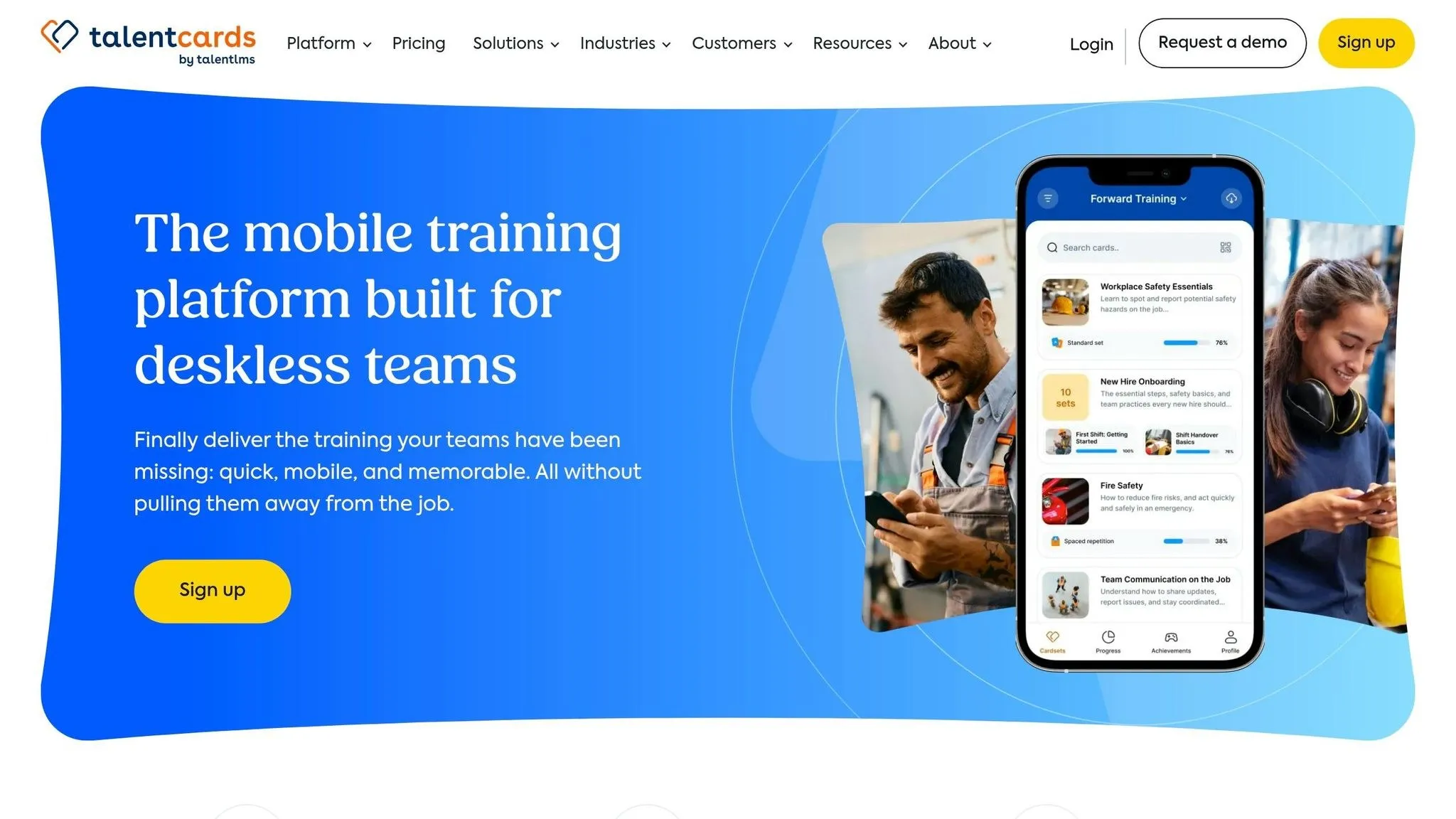
TalentCards works well for teams that need fast, mobile reinforcement for hands-on jobs.
Goal Fit
TalentCards is built for safety and field training, especially in construction, manufacturing, and service work. It helps workers remember protocols, equipment steps, and compliance refreshers in moments where quick recall matters more than long-form instruction. That makes it a strong fit for deskless teams working in the field. But it’s not a great match for soft skills or leadership training. You can see that tradeoff in the platform’s flashcard-first setup.
Content Format
The platform uses a highly visual, double-sided digital flashcard format that can include video, audio, and text [1]. In plain terms, it’s made for short reinforcement lessons, not deep teaching. That format also lines up with practice testing through active retrieval and distributed practice through spacing, both of which are effective learning strategies [5]. Because the experience is so simple, mobile use and offline access sit at the center of the product.
Delivery and Integrations
TalentCards is mobile-first, with native iOS and Android apps. It also includes an offline mode, so employees can download cards before heading to remote job sites [1]. In most cases, it works best as a specialized tool alongside a primary LMS. The main LMS can handle onboarding, deeper certifications, and broader reporting, while TalentCards handles short bursts of reinforcement [1].
Budget and Analytics
TalentCards does not publish standalone pricing. Its reporting covers completion tracking and compliance refreshers, but it does not offer advanced tracking, branching, or compliance workflows [1].
| Criterion | TalentCards |
|---|---|
| Best for | Safety training, field training, compliance refreshers |
| Content format | Double-sided visual flashcards with video, audio, and text |
| Active recall | Strong |
| Mobile app | Yes, native iOS and Android apps |
| Offline access | Yes, downloadable cards for remote job sites |
| LMS integration | Specialized tool; typically paired with a primary LMS |
| Team/admin reporting | Moderate, with limited advanced tracking and branching |
| Pricing transparency | Not published |
5. EdApp
Goal Fit
EdApp, part of the SafetyCulture ecosystem, sits between microlearning and LMS features [1]. It’s built for deskless teams in retail, manufacturing, and logistics [1]. Each lesson centers on one practical action, which makes it a strong match for onboarding, compliance, and quick refreshers [1]. In plain English, if your team needs short training that people can finish on the floor, in the warehouse, or between tasks, this setup makes sense.
Content Format
Its drag-and-drop authoring tool and Canva integration help teams build lessons with less friction [1]. EdApp also includes editable courses for topics like OSHA compliance and leadership [1]. Most modules run 3–5 minutes, which supports quick reinforcement and better recall [1]. That said, this format is built for short bursts of learning, not deep instruction. If you need long-form training or dense subject matter, it may feel a bit tight. For bigger teams, lesson design is only part of the story. Delivery and system fit matter just as much.
Delivery and Integrations
EdApp offers native iOS and Android apps, plus push notifications and offline access [1]. It also supports SSO, API access, user groups, and HRIS-based provisioning. For example, a setup tied to Workday can auto-update access when employees leave [1]. That can save a lot of admin work. The desktop experience feels mobile-first, which may be a drawback for desk-based staff [1]. So while it works well for frontline teams, office-heavy use cases may need a closer look.
Analytics
Its reporting tracks retention over time and workforce knowledge gaps, which gives managers more than a simple completion view [1]. Instead of just seeing who finished a lesson, they can spot where people are struggling [1]. For teams that care about reinforcement, that’s a useful difference.
| Criterion | EdApp |
|---|---|
| Best for | Deskless workers, compliance training, onboarding |
| Content format | Drag-and-drop modules, Canva integration, pre-built course library |
| Module length | 3–5 minutes |
| Mobile app | Yes, native iOS and Android with offline access |
| Enterprise integrations | SSO, API, user groups, HRIS provisioning |
| Analytics | Retention tracking, knowledge gap identification |
6. Axonify
Goal Fit
Axonify is built for companies that need training after onboarding, not just during it. Instead of acting like a course library, it works as a daily support system that helps frontline employees remember what matters on the job. That makes it a strong match for large teams in retail, logistics, and manufacturing, where safety, compliance, and revenue depend on repeatable day-to-day habits. The focus here is behavior change, not self-paced academic learning. It’s not a good match for academic self-study or for companies that want a storefront for selling courses. But if you need compliance reinforcement at scale, Axonify deserves a close look - especially since 90% of training content is typically forgotten within a week without reinforcement [11].
Content Format
Axonify keeps learning short. Its typical session runs 3–5 minutes, based on data from nearly 4 million microlearning sessions across 78 North American organizations [8]. The core format is simple: daily question prompts. Those prompts use spaced repetition to zero in on each employee’s weak spots, so people spend time on what they’re most likely to forget. To keep people coming back, Axonify layers in game-style features like:
- leaderboards
- points
- badges
- reward incentives These elements help keep engagement high and can lower test anxiety [8].
Delivery and Integrations
Axonify is built for frontline use. It offers native iOS and Android apps, push notifications, and offline access, which matters when employees aren’t sitting at desks all day [1][8]. In many cases, the platform fits right into the workday - often just after clock-in. There’s also a manager side to the system. When performance targets slip, managers can get real-time recommendations, which helps them coach the right people at the right time [8]. For integrations, Axonify connects with HRIS platforms like Workday and BambooHR for automated user provisioning and de-provisioning. It also works with SCORM/xAPI, Salesforce, Slack, and Microsoft Teams [1]. That automated de-provisioning piece is easy to overlook, but it matters. When an employee leaves, access is removed on its own, which helps protect proprietary data [1].
Budget and Analytics
Axonify sits in the premium enterprise tier, with custom pricing, and setup is more involved than what you’d get from a lightweight plug-and-play tool [1]. That extra lift is part of the tradeoff for stronger analytics. The platform tracks 5,000+ user data points per year and ties learning data back to business results [8]. Its question-based method also leans on test-enhanced learning, which can improve knowledge retention by as much as 41% [8]. That’s where Axonify stands out most: when training needs to connect straight to operational performance, not just course completion.
| Criterion | Axonify |
|---|---|
| Best for | Large-scale frontline and deskless workforces |
| Content format | Daily question prompts, spaced repetition, gamification |
| Module length | 3–5 minutes per session [8] |
| Mobile app | Yes, native iOS and Android with offline access |
| Enterprise integrations | HRIS (Workday, BambooHR), SCORM/xAPI, Salesforce, Slack, Microsoft Teams [1] |
| Analytics | 5,000+ data points per user/year; learning data linked to business results [8] |
| Pricing | Premium enterprise, custom pricing [1] |
7. LearnUpon
Goal Fit
LearnUpon is a good match for compliance-heavy teams that need the LMS side of microlearning handled well. It fits industries like financial services, healthcare, and construction, where missed certifications can create legal risk [3]. It also supports structured onboarding with automated learning path assignments based on job roles [3]. That said, LearnUpon is a full LMS, not a pure microlearning tool. So if your main goal is daily knowledge reinforcement or a consumer-app feel, this platform won’t get you there by itself. It works best as the LMS backbone for structured compliance training, not day-to-day microlearning. Its strength is administration and compliance control, not casual study.
Content Format
LearnUpon stands out for its compliance course library [3]. It also includes built-in certification tracking and renewal reminders, which means admins don’t have to spend time chasing employees to finish required training. Its AI features lean more toward admin support than learner engagement. Alerts for learners at risk of missing deadlines show who is unlikely to finish on time, and certificate-expiry alerts help teams avoid gaps in compliance coverage [3].
Delivery and Integrations
LearnUpon connects with HRIS systems for automated user provisioning and data syncing. In plain English, that keeps learner records up to date without piling more work on admins [3]. For rollout, expect 4–8 weeks, plus another 30–60 days for HRIS sync [3]. The interface is functional, not polished. That’s not always a deal-breaker, but it does matter if you want strong learner engagement. LearnUpon offers a 14-day free trial, which gives your team room to test the UX before signing a contract [3].
Budget and Analytics
All of that admin depth comes with enterprise pricing. LearnUpon uses custom pricing on a per-user annual basis, and mid-market plans usually start around $12,000–$20,000 per year for 100+ users [3]. Reporting is built around compliance outcomes, including automated audit trail generation, renewal tracking, and risk alerts [3]. For structured training programs, adaptive learning paths can cut time-to-competency by up to 50% [3].
| Criterion | LearnUpon |
|---|---|
| Best for | Compliance-heavy industries: healthcare, financial services, construction |
| Content format | Compliance course library, certification tracking, automated learning paths |
| AI features | Alerts for learners at risk of missing deadlines, certificate-expiry alerts [3] |
| Mobile experience | Functional, not consumer-app style [3] |
| Integrations | HRIS for automated provisioning and data syncing; API for microlearning tool add-ons [3] |
| Implementation time | 4–8 weeks; 30–60 days for full HRIS sync [3] |
| Pricing | Custom pricing; starts around $12,000–$20,000/year for 100+ users; 14-day free trial [3] |
8. Docebo
Goal Fit
LearnUpon leans harder into compliance control. Docebo goes in a different direction: AI-led personalization and skills mapping. It makes the most sense for large organizations that need role-based learning paths and skills reporting at scale. In practice, that means leadership can get gap-analysis reports based on roles, skill levels, and learning progress [3]. Full deployment usually takes 3 to 6 months [3], so this isn’t the kind of platform you pick when you need a fast launch next week. Use Docebo when audience size, role mapping, and reporting matter more than rollout speed. It’s a stronger match for structured enterprise learning than for standalone, quick-hit study.
Content Format
Docebo’s biggest draw is its AI-powered content recommendation engine. It suggests courses based on a user’s job role, manager-assigned goals, and individual skills assessments [3]. Put simply, the system can automate recommendations using role, goals, and skills data instead of leaving everything to manual assignment. The platform is SCORM and xAPI compliant and supports blended learning, which gives teams room to work with videos, documents, and structured courses [12]. Teams can also map competencies directly to roles. That setup works best when microlearning is part of a larger enterprise learning program, not the whole program by itself.
Delivery and Integrations
Once content is tied to roles, delivery comes down to how well Docebo fits into the rest of the HR stack. This is one of the platform’s stronger areas. Docebo supports native Workday and BambooHR integrations for role-based learning data, along with SSO [1][3]. Mobile access works, but it isn’t built first for frontline, on-the-go microlearning. So if your team spends most of the day away from a desk, that’s worth weighing.
Budget and Analytics
Custom pricing starts at about $20,000 per year for 100 to 500 users [3]. That’s a serious spend, but the analytics are built for teams that need more than completion rates. Docebo supports custom skills frameworks, competency-to-role mapping, and gap-analysis reports that L&D teams can bring straight to leadership [3]. The catch is pretty simple: you get deeper reporting, but you also take on more cost and a longer rollout.
| Criterion | Docebo |
|---|---|
| Best for | Enterprise organizations with 500+ employees and dedicated L&D teams [3] |
| Content format | AI-powered recommendations, SCORM/xAPI, blended learning |
| AI features | Role-based recommendations, skills gap analysis, manager-assigned goals |
| Mobile experience | Functional, not optimized for frontline or on-the-go use |
| Integrations | SSO, Workday, BambooHR, broad HRIS ecosystem |
| Implementation time | 3–6 months [3] |
| Pricing | Custom; starts around $20,000/year for 100–500 users [3] |
Pros and Cons by Solution Type
The tools above fall into four categories. Each one fits a different goal, audience, budget, subject, and delivery style. So the best choice depends on the learner, the content, and how much control you want over the learning experience. AI-powered tutoring apps like Henri AI are strongest when you want learning to adjust to each person. That makes them a good fit for skill growth that isn’t one-size-fits-all. The catch? More advanced AI platforms often take more setup time and a bigger upfront spend before you start seeing the payoff. Flashcard and quiz platforms shine when the job is simple recall. They’re great for facts, terms, and test prep, and spaced repetition helps people review without wasting time. But there’s a limit to the format. It works best for bite-sized knowledge, not messy or layered ideas. There’s also a behavior problem: habit-building is hard. Fewer than 16% of users who download a flashcard application remain active after the first week [6]. If recall isn’t the main goal, video-led tools usually make more sense. Short video lesson tools mix visuals and audio, which can help people grasp things faster. They’re handy for just-in-time training, product launches, and SOP updates. Still, watching a video can feel productive without leading to much memory. If you don’t pair it with retrieval practice, a lot of that learning can slip away. LMS-integrated microlearning systems like Axonify, LearnUpon, and Docebo are the better fit when compliance, reporting, and HRIS integration matter most. If you need one central system for audits or certification tracking, this is often the right move. The downside is pretty plain: more oversight usually means more cost and more admin work.
| Solution Type | Learning Strength | Creation Effort | Governance | Personalization | Best Fit |
|---|---|---|---|---|---|
| AI Tutoring Apps | High (adaptive) | Moderate (AI-assisted) | Moderate | High | Individual skill development |
| Flashcard/Quiz | Moderate–High | Low (rapid) | Low | Moderate | Facts, vocabulary, certifications |
| Short Video Tools | Low–Moderate | Moderate (production) | Low | Low | SOPs, launches, quick updates |
| LMS-Integrated | Moderate | High (structured) | High | Moderate | Compliance and onboarding |
With those trade-offs in view, the next section looks at which option makes the most sense for each common use case.
Best Choice by Scenario
Use these filters to narrow the best fit: goal, audience, content format, delivery, integrations, budget, and reporting. Stick with the same comparison filters from the sections above to trim your shortlist.
- Goal: Is this for compliance, reinforcement, self-study, or communication?
- Audience: Are learners desk-based or frontline and offline?
- Content type: Do you need authored modules, flashcards, or AI-generated study paths?
- Mobile/offline: Does the audience need native apps with offline mode?
- Integrations: Do you need SSO and HRIS sync?
- Budget: Are you comparing SMB pricing or enterprise plans?
- Analytics: Is basic completion reporting enough, or do you need gap tracking? For enterprise buying, ROI matters. Adaptive learning paths can cut time-to-competency by up to 50%, and integrated LMS platforms can cut admin overhead by 37% within six months. Once those filters are set, pair each use case with the right solution type below.
| Scenario | Solution Type | Key Strength |
|---|---|---|
| Onboarding & Compliance | LMS-Integrated Microlearning | Role-based access & audit trails |
| Frontline Skill Refreshers | Mobile-First / Deskless | 3- to 5-minute daily reinforcement & offline mode |
| Self-Study & Personal Growth | AI Tutoring App | Adaptive syllabus & active recall practice |
| Language Learning | Language practice | Gamification & memory decay modeling |
| Active-Recall Exam Prep | Flashcard / Retrieval Practice | Spaced repetition & active retrieval |
Frequently asked questions
How do I choose the best microlearning format for my goal?
Start by defining your goal: knowledge reinforcement, compliance, or skill development. For frontline or deskless workers, put mobile-first options at the top of the list. Offline access matters, and push notifications help keep training in front of people who aren't sitting at a desk all day. For desk-based corporate staff, browser-based delivery often makes more sense. It also helps to look for tools that connect with Slack or Microsoft Teams, so learning can fit into the flow of work instead of feeling like a separate task. Then match the format to the need. - Flashcards or quizzes work well for active recall - AI-assisted authoring helps turn documents into bite-sized lessons - An LMS with spaced repetition and HRIS or LMS integration supports tracking and compliance The idea is pretty simple: pick the setup that fits how your team works, then choose the learning format that fits what they need to learn.
When is active recall better than short video lessons?
Active recall works best when your goal is long-term retention, not just the feeling that something looks familiar. Short video lessons can help with that first round of exposure. They’re useful for getting the basics in your head. But they still count as passive review. That difference matters. Research shows that learners who actively retrieve information remember it better on delayed tests than learners who simply reread or restudy the same material. So if you need to firmly cement information in memory, active recall is the better move.
What should I prioritize: mobile access, integrations, or reporting?
Start with your workforce and admin goals. If you have deskless teams, put mobile access first. That matters most in logistics and retail, where native apps and offline use can make day-to-day training far easier. For desk-based teams, browser-based access may be a better fit. In some cases, tying the platform into Slack or Microsoft Teams can help more people take part. If compliance is the main concern, put reporting and integrations near the top of your list. Strong APIs and HRIS integrations can sync training records across your current systems, which helps you keep one source of truth.