
Henri Blog
How to Create Microlearning Courses That People Actually Finish
Short, one-outcome lessons with active recall, spaced review, AI help, and clear progress to raise course completion and retention.
By Henri · Updated
Most online courses lose people fast: long-form course completion often falls between 5% and 15%. If I want more people to finish, I need to make each lesson short, clear, active, and easy to resume. Here’s the short version:
- Give each lesson one outcome
- Keep it to 2 to 15 minutes
- Use a simple flow: hook, teach, check, apply
- Add active recall and spaced review
- Show progress at a glance
- Put help inside the lesson, including an AI tutor
- Track where people leave and fix that spot A few numbers stand out:
- 80% of new information can be forgotten within 48 hours without review
- Active recall can improve long-term retention by about 80% compared with passive review
- Retrieval practice can improve retention by 50% or more What this means is simple: people finish lessons that feel short, useful, and easy to restart. If a lesson feels heavy or vague, they stop. If the next step is plain, they keep going. My takeaway: build each lesson around one job, give the learner one small win, and make what comes next easy to see.
Microlearning Blueprint: 4-Step Formula to Boost Course Completion
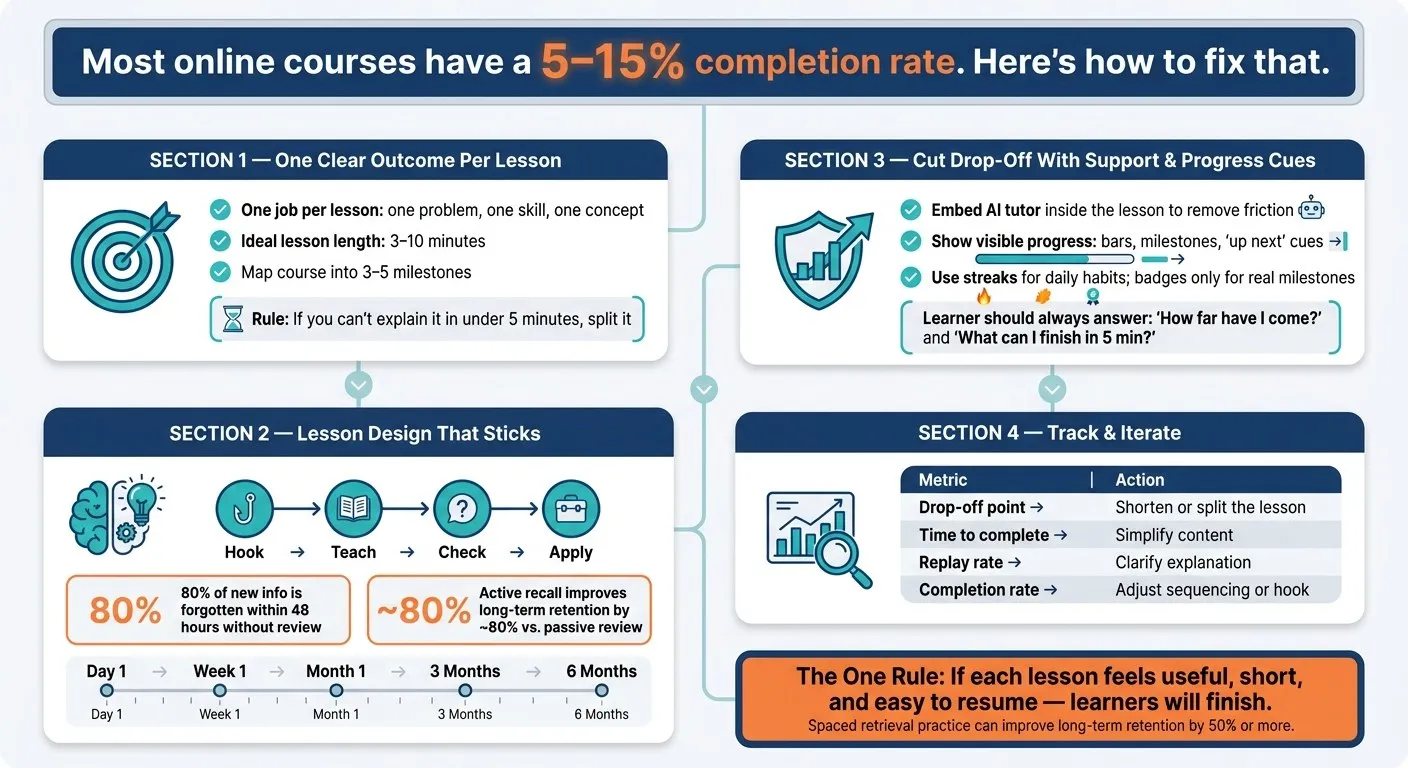
How to design effective microlearning aligned with the science of learning
1. Start Each Lesson With One Clear Outcome
The fastest way to keep learners moving is to make each lesson small enough to finish. Give every micro-lesson one job: solve one problem, teach one skill, or explain one concept. If a lesson has two outcomes, split it. Short, specific lessons reduce friction and make the next step clear.
Write lesson goals learners can complete in 3 to 10 minutes
A strong micro-lesson outcome should fit into a 3- to 10-minute window [2]. Here’s a simple check: use a 3- to 5-minute test. If you can’t explain the outcome with a quick example, the lesson is too big. Henry Dalziel says it this way:
“Can a specific outcome be clearly explained (with or without a working example) under five minutes? If the answer is ‘yes’, then you’re ready to start planning.” - Henry Dalziel, Educator [5] That test helps turn vague goals into specific skills. For example, “identify the 3 parts of a cash flow statement” works much better than “understand accounting.” Keep the lesson tight enough that a learner can finish it in one sitting.
Break big topics into a milestone path
Once each lesson is narrow, link them into a path that builds confidence early. After you define each outcome, map the course into milestones. Aim for 3 to 5 milestones, then break each one into short lessons. A simple flow works best:
- Start with quick wins
- Move into harder tasks over time
- Cut anything that doesn’t help learners reach the next milestone This order helps learners build momentum early. Those early wins make it easier to stick with the harder parts later. A clear path also cuts drop-off, because learners always know what comes next. Once each lesson has one outcome, the next step is designing it to hold attention long enough to finish.
2. Design Lessons That Hold Attention and Improve Retention
A clear outcome helps people start. Good lesson design helps them keep going.
Follow a simple lesson pattern: hook, teach, check, apply
Each micro-lesson should use the same simple flow: hook, teach, check, apply. Start with a question or problem learners already deal with. Then teach the idea in a short, focused way - two or three key points, and no more. After that, show one concrete example so the idea feels real, not abstract. End with a 30-second practice step, like a quick quiz or a short reflection prompt. Keep it tight. Use one scenario or one quick check per lesson.
Add active recall and spaced review by default
Passive reading and watching can feel productive. But that feeling can be misleading. Use active recall instead. Ask learners to answer from memory before you show the answer. That small pause does a lot of work. When people can pull the answer from memory, they’re less likely to get stuck in the next lesson. Research shows that active recall leads to 80% better long-term retention than simply re-reading or re-watching material [1]. And without review, learners forget about 80% of new information within 48 hours [4]. A simple spacing schedule helps keep that knowledge from slipping away:
- Review after 1 day
- Then again after 1 week
- Then after 1 month
- For long-term goals, extend review to 3 months and 6 months [4]
Use interactivity to prevent passive scrolling
Text-heavy screens make people scroll. They don’t always make people learn. Small interactions help keep attention in the lesson: choosing an answer, making a decision, or typing a one-line response. Nothing fancy. Just enough to make the learner do something. Each interaction should answer one lesson question. Think of it like a small checkpoint. Every time the learner clears one, they get a quick win and a reason to keep moving. Once the lesson feels active and easier to remember, the next step is cutting drop-off with support and clear progress cues.
3. Use AI Support, Progress Cues, and Motivation Design to Cut Drop-Off
Even well-built lessons can lose people when support disappears, progress feels fuzzy, or momentum fades. People drop off when they get stuck, can’t tell how far they’ve come, or mean to come back and never do.
Add a conversational AI tutor inside the lesson
When a learner gets stuck, every second spent hunting for an answer outside the course is a moment you might lose them. An embedded AI tutor inside the lesson fixes that problem by keeping help in the same place as the work. A good AI tutor can gauge what a learner already knows, skip past material they’ve already mastered, and adjust the difficulty so the lesson stays hard enough to matter without becoming frustrating. It can also create short check-ins and practice prompts based on the lesson itself. Ground the tutor in verified source material to keep answers accurate [3]. The goal is simple: remove the moment that would have made the learner stop.
Show progress clearly with bars, milestones, and next-step cues
If progress is invisible, it often feels like nothing is happening. People are more likely to finish when they can see movement. Completion percentages, chapter markers, and progress bars give learners a clear sense that they’re moving forward. But one of the most missed tools is the “up next” cue - a plain preview of what the next lesson includes. Instead of a vague “continue” button, tell them what they get: “Next: handle a common objection in 2 minutes.” That level of detail gives them a reason to keep going now instead of putting it off [5]. At any moment, learners should be able to answer two questions right away:
- How far have I come?
- What can I finish in less than 5 minutes next? If your course can’t answer both on sight, add those cues before you publish.
Use streaks and badges tied to real progress
Streaks work because of loss aversion. Once a learner has built a 14-day streak, the psychological discomfort of breaking it becomes a stronger motivator than the reward of extending it [1]. Use streaks to support daily habit-building. Use badges only for actual milestones, like finishing a chapter or passing a quiz. Once these parts are set up, fold them into a repeatable build process.
4. Turn Your Design Into a Repeatable Build Process
Choose a format and tool that match the lesson goal
Pick the format based on what the learner needs to do with the information, not just watch or read. Match the format to the task. A short video works well for first exposure. After that, move into practice with a quiz, flashcards, or a chat tutor. If the lesson calls for guided practice, use a conversational AI tutor. Once you’ve chosen the format, look at the next problem: where learners get stuck.
Track the numbers that show where learners drop off
Track friction, not just completion.
| Metric | What It Reveals | What to Do |
|---|---|---|
| Drop-off point | Where in the lesson learners quit | Shorten the lesson or split it into two |
| Time to complete | Whether the lesson is harder than intended | Simplify content or shorten the lesson |
| Replay rate | Confusion or high-value moments | Clarify the explanation or flag it as a key takeaway |
| Completion rate | Overall relevance and motivation | Adjust sequencing or add a stronger hook |
These numbers usually tell a pretty clear story. If learners leave early, the lesson is probably too long at the start. If they drop off in the middle, the content may be too dense, or the first interaction may show up too late. If they finish one module but don’t start the next, the handoff likely needs work. In that case, add a hook at the end of the segment to pull them forward [5].
Run a launch checklist before you publish
Pilot the lesson with a small group before launch. The best sign that the pilot is working is repeat use, not just completion data [6]. Publish only when each lesson passes these checks:
- One outcome per lesson, stated at the start
- Under 15 minutes to complete [1]
- One interaction early in the lesson, such as a quiz, recall prompt, or scenario
- One visible progress cue the learner can see without scrolling
- One spaced review moment scheduled after the lesson ends
- One reminder channel in place Then use the pilot results to adjust lesson length, interaction timing, and sequencing before a broader rollout.
Conclusion: A Simple Blueprint for Microlearning People Actually Finish
Microlearning works best when it’s easy to start and even easier to keep going. The formula isn’t complicated. Give each lesson one clear outcome. Keep sessions under 15 minutes. Arrange lessons so one naturally pulls learners into the next. Then add active recall and spaced review so people keep what they practice. Mix in interactivity so the lesson never slips into passive scrolling. When learners get stuck, conversational AI can help them move forward. And when progress is easy to see, finishing feels a lot closer than quitting. The pattern is pretty plain: shorter lessons and active recall lead to better completion and better retention. Strategically timed retrieval practice can improve long-term retention by 50% or more [4]. That’s often the line between a course people abandon and a course that changes what they do.
The one rule to keep in mind
With those parts in place, one rule matters most. If each lesson feels useful, short, and easy to resume, learners will finish. That’s the blueprint. Everything else - streaks, progress bars, AI tutors, spaced review - exists to support that bar. When a lesson meets it, the next step feels natural. When it doesn’t, no streak or progress cue can make up for it. Build around that standard, run the launch checklist, watch where learners drop off, and adjust. The courses people finish usually aren’t the most sophisticated. They’re the ones that respect the learner’s time and make the next step feel worth taking.
Frequently asked questions
How do I know if a lesson is too long?
A lesson is too long when explaining the learning objective takes more time than doing the task itself. With microlearning, video lessons usually work best at 2 to 5 minutes. And the full session should stay under 15 minutes. That keeps the barrier to getting started low. There’s another simple gut check: if one lesson covers more than one objective or subtopic, it’s probably too dense. And when learners start to feel overloaded, the lesson has likely pushed past the microlearning limit.
What should I put first in a micro-lesson?
Start with one clear learning goal tied to one specific subtopic or problem. That gives the lesson a clear point from the first moment and shows learners exactly what they’re working toward. When the first interaction stays centered on one doable outcome, the lesson feels easier to follow. It lowers cognitive overload, helps people stay focused, and makes progress easier to spot.
How can I tell why learners are dropping off?
Learners usually quit because of design problems, not because they lack discipline. A few common issues tend to get in the way: - Sessions are too long, so getting started feels like a chore. - There’s no accountability and no clear sign of progress. - The content is passive, with little or no active recall. - The pacing is one-size-fits-all, so it can feel either too easy or too hard. When those problems stack up, even motivated learners start to drift.